Dukovo is fast, beautiful and private, and it answers to you. No forced online accounts, no ads, no age checks, and no surprise restarts. Just your computer, the way you like it.

Dukovo is in development and there is nothing to download yet. Dukovo Server comes first, and the desktop shown here follows.
Made for people
Every choice in Dukovo starts with one question: what is best for the person using it?
Set up and sign in with a local account, no internet sign-up needed. Any password you like, with a friendly warning if it is weak. Passkeys are there if you want them.
Dukovo will never ask who you are to let you use your own computer. Parental controls are there for families who want them.
Updates wait for you. You pick when to install and when to restart, and a bad update rolls back in one step.
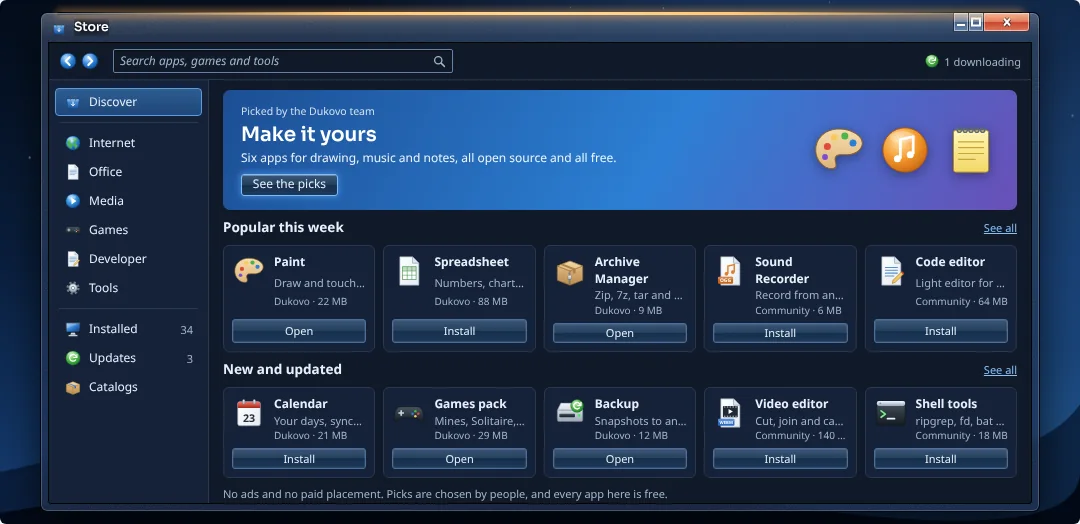
No paid placement and no "sponsored" apps. Every app shows who made it and where it came from.
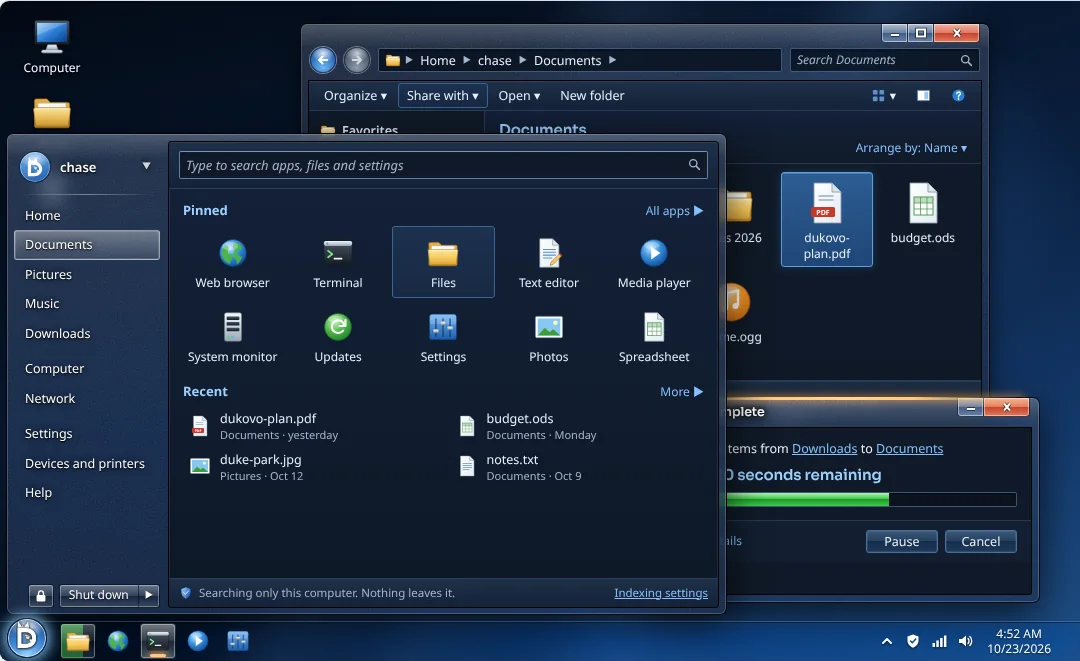
Search covers your apps, files and settings, and nothing you type leaves your computer.
Folders and settings use plain words, so anyone can look around and understand what is what.
Dukovo is built for the people who use it, not for shareholders or advertisers. No data harvesting, no tracking, no ads in the system, and nothing about you is ever for sale.
Dukovo takes no sides. It is a system for everyone, wherever you live and whatever you believe. No agenda, just great software.
Coming with the desktop
Pick the desktop that feels like home, and switch any time in Settings. Every style is just as fast. Inspired by the past, built for the future.

Horizon: a taskbar, a Start menu and windows you can snap to any edge. The default.
Coming with the desktop
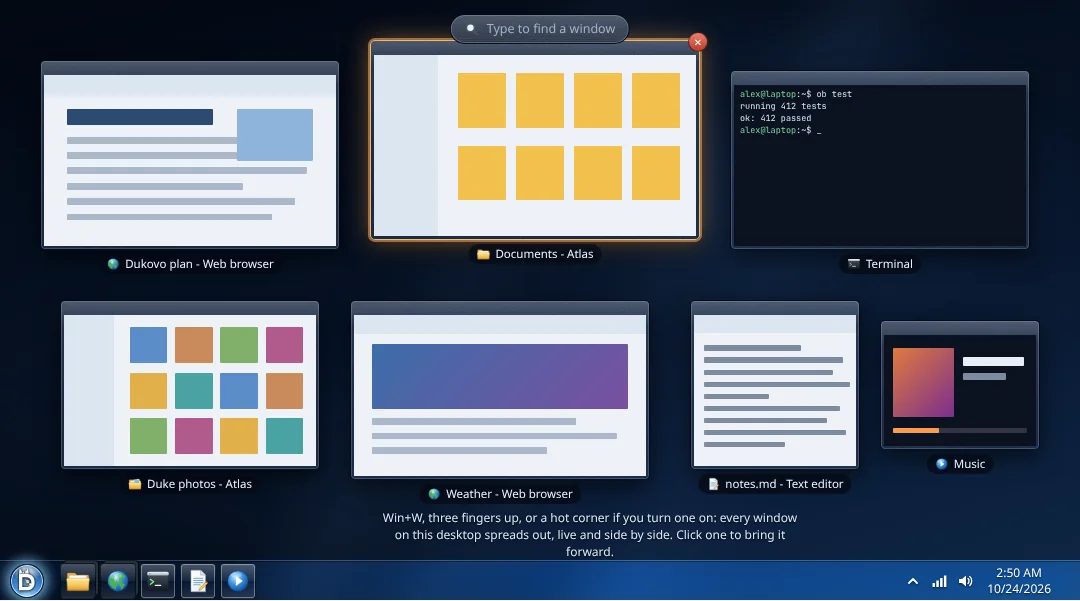
Spread lays out all your open windows side by side, live. Type to filter, click to jump, or drop a file straight onto a window.

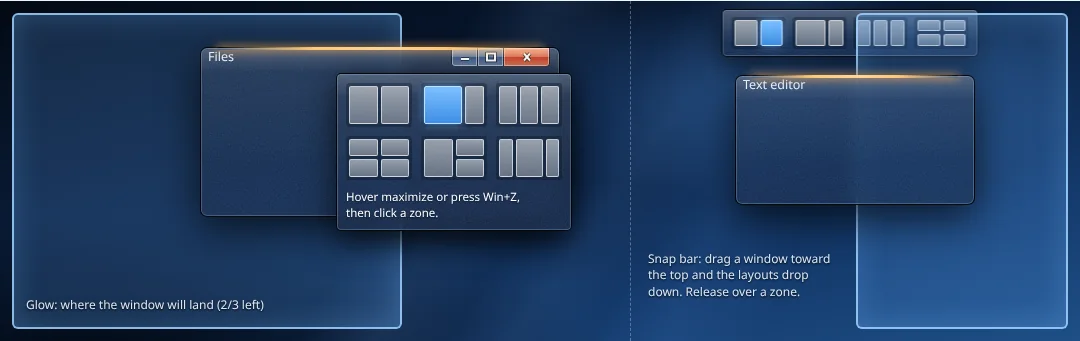
Drag a window to an edge or corner and it snaps there. Hover the maximize button for ready-made layouts, or draw your own zones for the way you work.

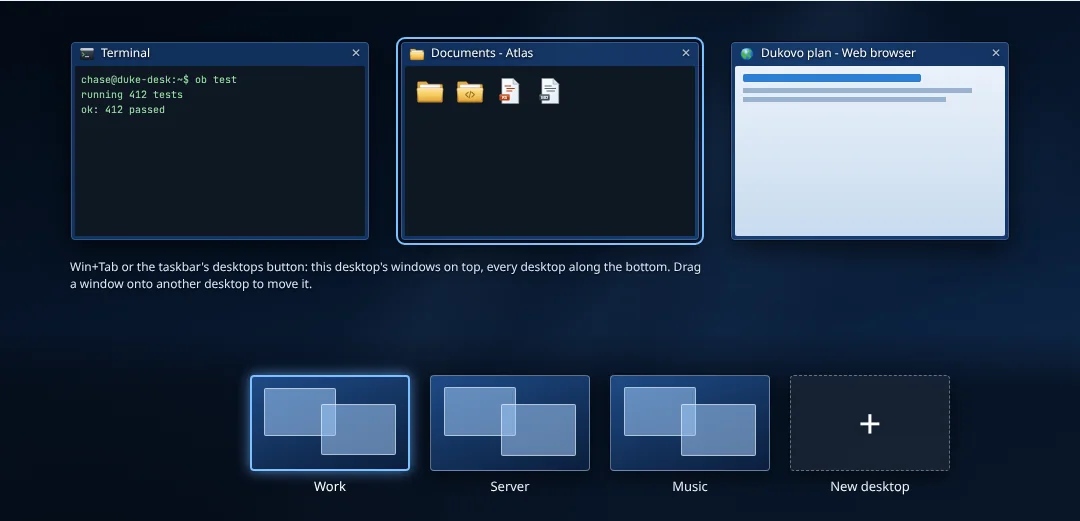
Keep work, play and side projects on their own desktops, and give each one a name. Drag a window from one to another, or swipe between them with four fingers.

A taskbar on every screen, and Dukovo remembers each setup, so plugging into your dock puts every window back.
Hover an app to see live previews of its windows, and close one right there.
Twelve gestures that follow your fingers, all changeable, even per app.
Let someone else sign in while your apps keep running, right where you left them.
Ask a question, get help writing, or have it explain an error. Nebix runs entirely on your computer, it is off until you turn it on, and it never keeps a history of your screen. Coming in a later 1.x release.
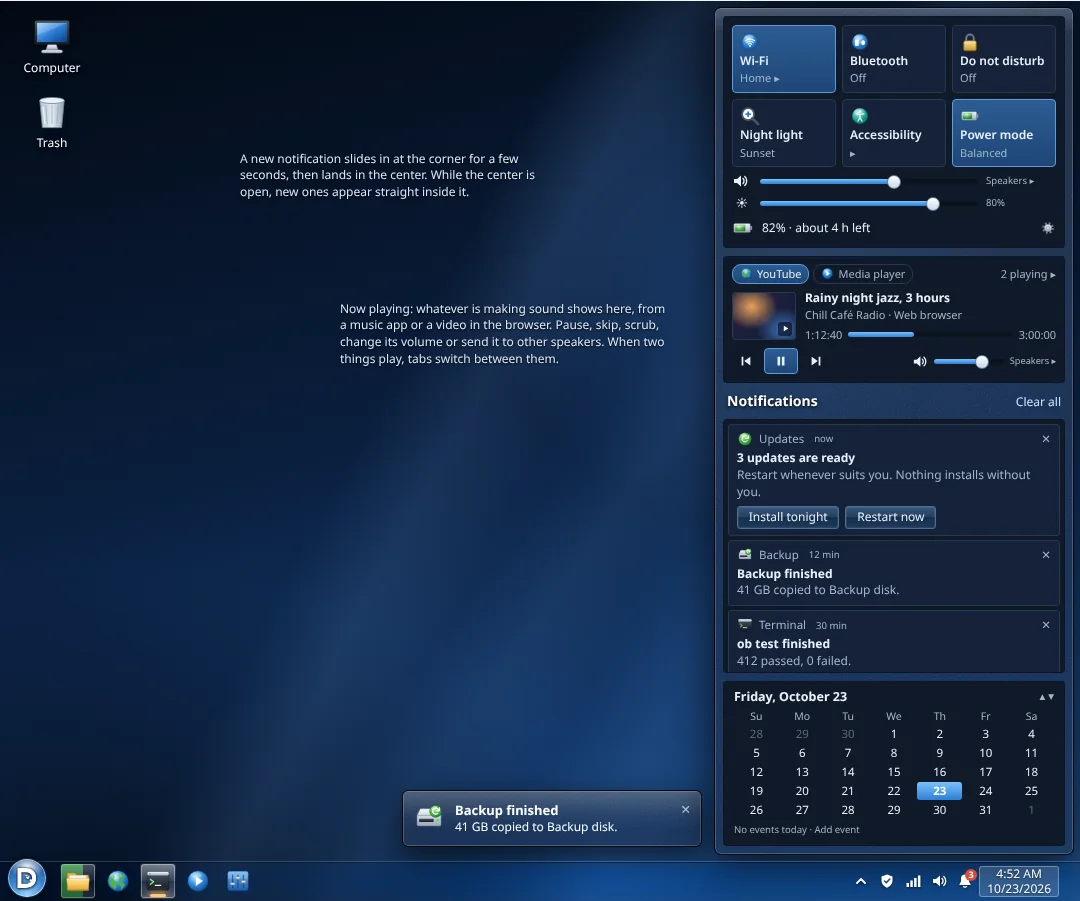
Quick settings, notifications, your calendar and what's playing, all behind one bell. Do Not Disturb is a tap away.

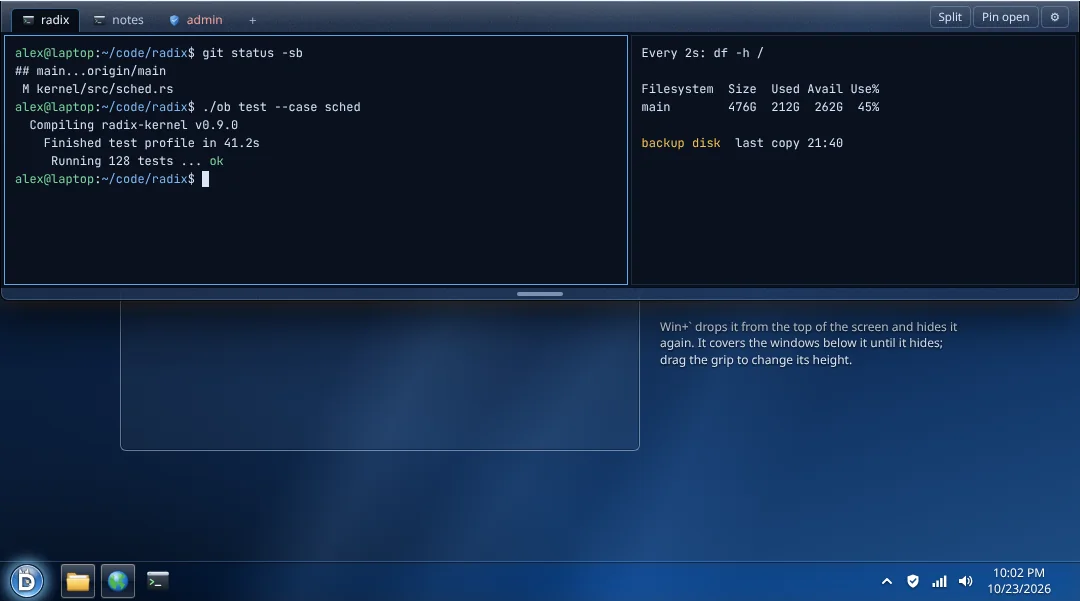
Press one key and a terminal slides down over everything. Press it again and it's gone. Tabs, splits and sessions all stay put.

The Store is hand-picked by people, with no ads and no paid placement. Remove an app and Dukovo asks whether to keep its data, so nothing disappears by surprise.

A built-in screen reader speaks from the boot menu on, with text scaling, reduced motion and sticky keys.
Restart or shut down, and your apps and windows come back just as you left them.
Printers and scanners on your network show up on their own, no drivers to hunt for.
Built-in file sharing that works with the other computers in your home or office.
No drive letters, just your disks by name. Tags, previews and a sidebar you arrange yourself.
Dictate anywhere, with speech recognition that runs on your computer, even with Nebix off.
Night glass by default, a bright Daybreak look, and a high-contrast theme for easy reading.
Ctrl+C, Ctrl+V, Ctrl+Z and Ctrl+S work everywhere, out of the box.
One vision
The kernel, the shell, the desktop, the apps and updates are designed together, to one standard, by one project. You never have to wonder which pieces fit together.
Every app is a bundle. No competing formats, no hunting for the right package.
Every app is built with the same toolkit, so everything matches and works the same way.
System, apps and firmware update together, tested together.
Software that behaves · Coming in 1.0
Every app is one file. It lives in its own space, asks before it touches anything, and leaves cleanly when you are done with it.
Drop a bundle in Apps, or click Install in the Store. Its menu entries, file types and commands appear on their own.
The app sees only its own folder and what you hand it. It asks once, in plain words, for anything more.
Everything it added goes with it. Dukovo asks whether to keep your data, and a reinstall picks it right back up.
System, apps and firmware update together with one command or one click, when you choose.
Every update is signed and verified before it installs, so nobody can slip in a fake one.
The new system installs beside the old one. If it won't start properly, Dukovo boots the last good one on its own.
Apps can't run code while installing or quietly change your system. What you see in the bundle is what you get.
Updates never overwrite settings you changed. The new defaults sit beside yours for you to compare.
Use the Store, add other catalogs, or open an app file you trust. Dukovo shows a clear warning, then lets you decide.
Speed is a feature
These are hard targets, and the build checks them. If Dukovo gets slower, the change does not ship.
The heart of Dukovo
A brand-new kernel, written in Rust, designed for safety from the first line.
Most systems still run on foundations laid decades ago. Radix starts fresh, with today's hardware and today's threats in mind, and every part of it is tested on every change.
In Radix, every file, device and connection is reached through an unforgeable capability, a key handed out on purpose. A program can't reach for something it was never given, so one bad app can't take over your system.
Rust rules out whole classes of memory bugs, the cause of most serious security flaws in older kernels.
Its core rules are proven with Kani proofs and modelled with TLA+, on top of the tests that run inside the kernel itself.
A random load address on every boot, memory that is never both writable and runnable, guard pages, SMEP and SMAP.
It starts every CPU, keeps memory close to the core that uses it, and gives each core its own fast caches.
Threads share time fairly or run with real-time priority, and resource domains keep one busy task from starving the rest.
Programs talk over endpoints, shared-memory channels and ring buffers built to move data without wasted copies.
For power users
The tools you rely on work right away: bash scripts, grep, sed, awk, tmux, ssh and thousands of C and Rust programs. Underneath is something new. Dukovo isn't a copy of an old system with fresh paint. It's a modern OS designed from scratch for today's hardware and today's threats.
/ ├── applications installed apps ├── users │ └── alex your files ├── volumes │ └── Backup disks, USB sticks, SD cards ├── shared files for everyone ├── system │ ├── commands programs │ ├── libraries shared code │ ├── resources manuals, fonts, licenses │ ├── settings your configuration │ ├── state logs and caches │ └── live running services ├── tmp temporary files, gone at restart ├── devices hardware ├── processes what's running └── kernel hardware and kernel settings
Every top-level folder is shown; deeper folders are left out. The classic short names still work for old scripts, tucked out of sight.
Nukesh is Dukovo's own shell, written in Rust. It colors your commands as you type, catches typos before you press Enter, and runs the bash scripts you already have.
alex@laptop ~/site ❯ ls assets deploy.sh backup.tar.zst README.md alex@laptop ~/site ❯ sevice status web nukesh: sevice: command not found. Did you mean service? alex@laptop ~/site main ✓ ❯ ./deploy.sh --dry-run "$HOST" ✓ 14 files checked, nothing to change alex@laptop ~/site admin # service restart web▌
Coming first
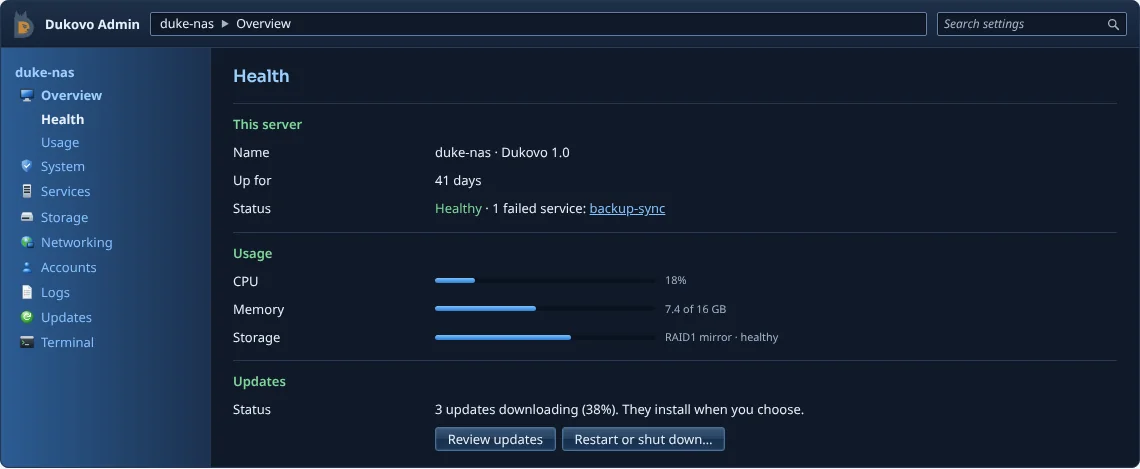
The first release is a rock-solid server for your homelab or your business. Mirrored storage, atomic updates, and Dukovo Admin, a web console that makes running a server feel easy.

Support Dukovo
Dukovo has no ads and no investors to answer to. It is paid for by the people who want it to exist. If you would like to help, every gift goes into building it.
Give once or every month with your GitHub account. GitHub charges personal sponsors no fee, so the whole gift reaches the project.
Sponsor on GitHubGive by card, no GitHub account needed. Companies get a proper invoice, and every dollar in and out is public.
Give on Open CollectiveGifts to Dukovo are not tax-deductible. Thank you for helping.
Dukovo is coming soon, and it's built in the open. Watch it grow, say hello, or lend a hand.
[email protected][email protected]